Modern Outlook is not designed for notification-driven workflows

I really like to customize my environment: colors, themes, shortcuts, programs I use, and the way I use them. I don’t like when a tool designed to be “smarter” than a user. Of course it is okay to create such applications, but it is just not about me. I like to configure, to discover the internals and features which can simplify my work. Just remember a famous phrase “a sleepy admin is a good admin” because everything is working properly and automated.
So it was really annoying to me that email messages cannot be automatically moved to a specified subfolder and system notify a user about new income message. Because I want to be notified and want to keep my inbox neatly organized.
I tried to make it happened several times and always fail. Felt angry and disappointed. Finally I got understand why it cannot be done, and that such limitation was made intentionally. There are a lot of questions about this topic (1, 2) and even feature request, but it is still not done.
So, basically Microsoft tells us about only 2 ways of Inbox subfolders usage:
- Organize emails manually: read and move - all by hands, e.g. twice a week or every morning.
- Organize emails automatically by rules: for correspondence what is not important at the moment of receiving.
In combination with the following limitations:
- Rules are applied only at the moment of receiving or manually
- Moved email will not have notification in the new version of Outlook
- Absence of clear and acknowledged UI for new unread emails in a subfolder (a.k.a. counters)
It narrows workflow only to the next 2 ways:
- Either user manually organize their emails into subfolders by day-to-day routine.
- Or occasionally recall to check emails in a subfolder.
Being a developer means to receive a lot of notification emails: Jira tickets statuses and comments, Bitbucket PRs notification, Jenkins builds successes and failures - a lot of notifications.
All these notifications are meaningful only at the moment they are received. That means that I cannot use rules to move them into preferred subfolders, and I cannot leave my Inbox folder well organized automatically.
I tried to imagine workflow what will be applicable for managers, i.e. not developers. And in all the ways such situation means that either you will have piles of garbage emails in Inbox folder or miss instant notification at all. Damn.. thank you Microsoft.
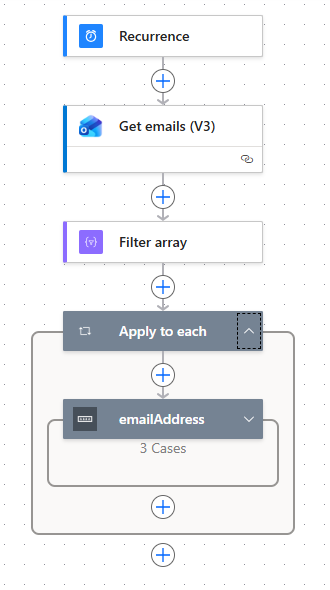
I found a solution (and I do not like it) - Power Automate. It is a cloud lambda-function programming platform. You can create a “function” and schedule to run it every 4 hours, for example:
- Get up to 100 read emails from Inbox;
- Filter them by age: received more than 4 hours ago;
- Switch case by sender: Jira, Bitbucket, Jenkins;
- Move message to a specific subfolder.
In such way user still receive instant notifications and the Inbox folder will be automatically kept organized. Received and read emails will be moved to a related subfolder every 4 hours, unread emails will be kept untouched.
Specific implementation can be done with help of AI, because there is used not a “programming language” in normal meaning, but property-based actions, income sources, and outcome results. Every run takes up to 1 minute. Huge overcomplication.